




BACK TO BLOG
Product Updates

Windows Update Functionality for Remote Desktop Servers

It's now possible to update Remote Desktop servers directly from the platform! We understand the challenges involved in periodically updating Windows servers, especially when accessing each machine individually.

April 30, 2025
·
Manuel Pérez Gómez-Miranda
Table of contents
Example heading content

It's now possible to update Remote Desktop servers directly from the platform! We understand the challenges involved in periodically updating Windows servers, especially when accessing each machine individually. To address this, a new subsection called “Updates” has been added within the Remote Desktop subscription. This feature enables you to perform, from the platform, the same Windows Update actions as you would by accessing the server directly—but in a centralised and more efficient manner. This simplifies the management and scheduling of Windows Updates on Remote Desktop servers. Have a look!

Where to Manage Windows Updates?

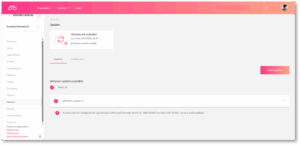
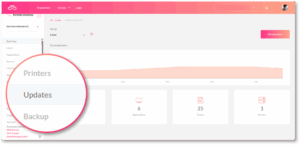
To schedule and manage Windows Updates on a Remote Desktop server, navigate to: Remote Desktop Subscription > Updates

Windows Updates - Product News 1
Windows Updates - Product News 2
Windows Updates - Product News 3

Each time you access this section, the platform automatically performs a check for pending updates on the servers linked to the Remote Desktop subscription, listing them as available updates.

More Information and Next Steps

In response to our partners' needs, Jotelulu continues to update and enhance its services to make management simpler, faster, and more efficient. This new feature focuses on streamlining maintenance and update processes for deployed environments. If you need more details on this functionality, please contact our team at growth@jotelulu.com. We hope this new feature proves helpful. Let's go!


Read more

Product Updates
Manuel Pérez Gómez-Miranda
·
6.25.26

How to configure and troubleshoot time issues in Windows Server?

Configure and troubleshoot time synchronization issues in Windows Server using NTP, CMD and PowerShell to avoid domain and security problems.
Read article
Product Updates
Manuel Pérez Gómez-Miranda
·
6.22.26

Extended support hours at weekends

Partner Success now available weekends too! Mon-Fri 08:00-20:00, Sat-Sun 09:00-18:00 [GMT+1]. Ideal for migrations & maintenance without disrupting SME operations.
Read article
Product Updates
Manuel Pérez Gómez-Miranda
·
6.22.26

Assisted Migrations, the new feature for migrating cloud environments with support from Partner Success.

Migrate cloud and on‑premise environments to Jotelulu faster and with less risk thanks to Assisted Migrations and extended Partner Success support hours.
Read article
Back to blog